Unlocking your AT&T phone before you sell it can make the handoff smoother, widen the pool of potential buyers, and reduce those awkward “why won’t my SIM work?” messages after the sale. The good news: you can usually do it yourself through AT&T’s official unlock process, as long as the phone meets AT&T’s eligibility rules. This guide walks through how to unlock an AT&T phone yourself for free before you sell it, plus what to check before wiping the device.
Can you unlock an AT&T phone yourself for free?
Yes, in many cases you can unlock an AT&T phone yourself by using AT&T’s official device unlock request process. AT&T says eligible Apple, Samsung, and Google devices on AT&T Wireless may unlock automatically, but if your phone still shows as locked, you can submit an unlock request and follow the instructions sent by email or text. (att.com)
The key phrase is “eligible.” Unlocking is not a workaround for an unpaid phone, a reported lost or stolen device, or a phone still tied to another account. If you want to sell the phone, handle the unlock before you list it whenever possible; it is much easier to fix account, payment, or confirmation issues while the phone and account details are still in your control.
What unlocking actually means
A locked phone is restricted to a specific carrier’s network. So if your AT&T phone is locked, a buyer using another compatible carrier may not be able to activate it with their SIM or eSIM, even if the phone itself works perfectly.
Unlocking removes that carrier restriction. It does not erase the phone, remove your photos, cancel your AT&T service, pay off your installment plan, or guarantee the phone will work on every network. Compatibility still depends on the buyer’s carrier, the model, supported bands, and whether the device is blocked for any reason.
That distinction matters when you sell. “Unlocked” should mean the carrier lock has been removed, not simply that you know the passcode or have factory reset the device.
Check whether the phone is already unlocked
Before you submit anything, check the phone’s current lock status. You might discover there is nothing left to do, especially if the device already met AT&T’s rules.
For an iPhone, open Settings, go to General, then About, and look for Carrier Lock. If it says SIM locked, the phone is still locked; if it says there are no SIM restrictions, it is generally ready for another compatible carrier. AT&T also notes that eligible Apple, Samsung, and Google devices on AT&T Wireless may unlock automatically once requirements are met. (att.com)
For Samsung phones, AT&T’s current guidance depends on the release timing. Some older Samsung devices can be checked through Settings > About phone > Software information by reviewing the service provider software version, while Samsung devices released after September 1, 2025 may show Network lock status under Connections > More connection settings. (att.com)
You can also test with a non-AT&T SIM card if you have one available. If the phone complains that the SIM is not compatible with the AT&T network, that is a strong sign it is still locked. AT&T mentions this SIM-card check specifically for AT&T Prepaid devices. (att.com)
Make sure the phone is eligible first
This is where most failed unlock attempts happen. Before you click through the request form, take five minutes to check the basics.
For AT&T Wireless devices, AT&T lists several common requirements: the device must have been bought more than 60 days ago, must not be active on another AT&T account, must be paid in full, must not be reported lost, stolen, or involved in fraud, and the current AT&T customer’s account cannot be past due. (att.com)
For AT&T Prepaid, the rules are different. AT&T says a prepaid device can be unlocked if it has 12 months of paid AT&T service, is not active on another AT&T account, and has not been reported lost, stolen, or involved with fraud. (att.com)
Use this quick checklist before you try to unlock my phone or tell a buyer it is unlocked:
- Installment balance: Paid off in full, with a zero balance.
- Account status: No past-due balance if you are a current AT&T customer.
- Device age: More than 60 days since purchase for AT&T Wireless devices.
- Prepaid service: 12 months of paid AT&T service if it is an AT&T Prepaid device.
- Account attachment: Not active on someone else’s AT&T account.
- Device status: Not reported lost, stolen, or connected to fraud.
- Business device: Not restricted by company controls, contracts, or approval rules.
If one of those items is not true, fix that first. For example, paying off the device may not instantly make every system update at the same moment, so give yourself some breathing room before you plan to meet a buyer.
How to unlock AT and T phone step by step
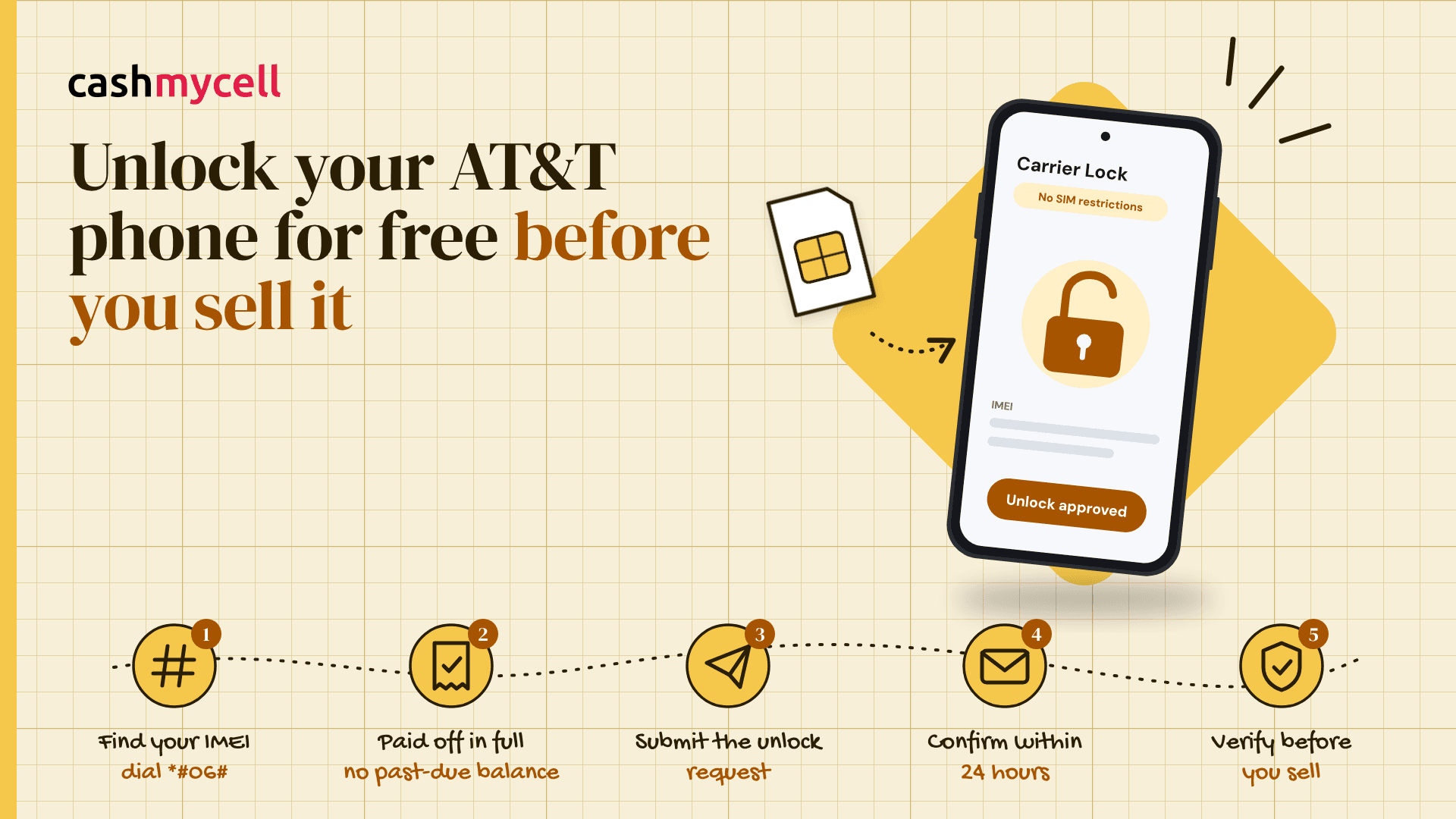
If you came here searching “how to unlock at and t phone,” the basic process is refreshingly simple: confirm eligibility, submit the request through AT&T, confirm the request if AT&T asks you to, then follow the device-specific instructions.
Here is the practical version:
- Find your IMEI. On most phones, you can dial *#06# to display it. You can also usually find it in the phone’s settings.
- Check your payoff and account status. Make sure the phone is paid off and the account is not past due if you are the current AT&T customer.
- Go through AT&T’s device unlock request flow. AT&T says people without an AT&T account can still submit an unlock request for an AT&T device that meets all requirements. (att.com)
- Enter the requested information carefully. A mistyped IMEI or email address can slow things down or make it look like nothing is happening.
- Watch for the confirmation message. AT&T says non-AT&T customers are sent an email asking them to confirm the unlock request, and that the confirmation link must be selected within 24 hours or a new request is needed. (att.com)
- Follow the instructions AT&T sends. Some phones unlock over the air. Others may need an unlock code or extra steps, depending on the model.
- Verify the result before selling. Check the phone settings again or test with another carrier’s SIM if you can.
AT&T says an unlock request is often approved within a few minutes, but it can take up to 48 hours. That is another reason not to wait until the buyer is already at your door. (att.com)
iPhone, Android, and prepaid details to know
For newer iPhones, the unlock is often not something you manually type in. Once AT&T approves the request, the phone should receive the updated lock status. If you have an iPhone 13 or earlier, AT&T notes that you may need to perform a factory reset before the device unlocks. (att.com)
For Android, the experience varies more by brand and model. Some devices may ask for an unlock code after you insert a non-AT&T SIM. AT&T Prepaid Android devices may use the AT&T Device Unlock app, while AT&T Prepaid iPhones use the unlock request process. (att.com)
If you are selling an eSIM-only phone, do not assume a buyer can “just pop in a SIM” to test it. In that case, the settings screen and AT&T’s confirmation become more important. Mention in your listing that the device is eSIM-only if that applies.
Fix common unlock problems before listing
If the unlock request fails, do not panic. Most issues fall into a few predictable buckets, and many are fixable.
- “Not paid off” message: Check the installment plan and make sure the payoff has processed.
- Past-due account: Bring the account current, then try again after the payment posts.
- Wrong IMEI: Recheck the number from the device itself, not an old box or receipt.
- No confirmation email: Look in spam or junk folders, especially if you are not an AT&T customer.
- Still tied to another account: Remove the device from any active account before trying again.
- Prepaid timing issue: Confirm the device has the required 12 months of paid AT&T Prepaid service.
If you are selling locally, avoid promising the phone is unlocked until you have proof. A better listing line is: “AT&T phone, unlock request approved” or “Carrier Lock shows no SIM restrictions,” depending on what you can actually verify.
Prepare the phone for sale after unlocking
Unlocking is only one part of getting a phone ready for a new owner. Once the phone is unlocked and reset, compare cash offers from verified buyers to find the best payout before you list it anywhere. You also need to protect your personal data and remove account locks.
For iPhone, Apple says that erasing the iPhone removes personal information, and if Find My was turned on, Activation Lock is removed when the device is erased, making it ready for a new owner. (uw-product.cc) If you are moving to a non-Apple phone, Apple also recommends deregistering iMessage so your texts do not get stuck in Apple’s messaging system. (support.apple.com)
For Android, Google says a factory reset removes data from the phone. Before you reset, back up anything you want to keep and make sure you know your Google Account details, because reset protections can make setup harder if the account is not handled correctly. (support.google.com)
A simple selling-prep order looks like this:
- Back up your data.
- Unlock the AT&T phone and verify the result.
- Sign out of personal accounts where needed.
- Remove your SIM or delete your eSIM.
- Factory reset the phone.
- Clean the device and photograph it honestly.
- Share the model, storage, condition, and lock status in the listing.
The smart seller’s takeaway
If you want the smoothest sale, unlock the phone before you list it, not after someone has already paid. Check the lock status, confirm AT&T’s eligibility rules, submit the official request, and wait for approval before you wipe the device.
A properly unlocked, reset, and clearly described phone is easier for buyers to trust. It also saves you from post-sale troubleshooting, refund requests, and confusion over whether the phone was truly ready for its next owner.