Siri AI on iOS 27 vs Google Assistant is no longer just a fight between two voice tools that set timers or answer trivia. It is now a choice between Apple's deep, privacy-first assistant and Google's Gemini-powered assistant, which grew out of Google Assistant on mobile. For most people, the best pick depends less on one winner and more on the phone, apps, smart home setup, and privacy habits they already use each day.
If you live inside one platform, the answer is usually clear. If you use both, the better move is often to split tasks. Siri can handle the phone. Gemini can handle the web-heavy work. That is why the real debate is now about workflow, not just voice.
What is the real difference between Siri AI on iOS 27 and Google Assistant?
The real difference is ecosystem design. Siri AI is built around Apple Intelligence, personal context on Apple devices, and on-device or privacy-protected processing. Google Assistant on mobile has mostly turned into Gemini, an AI assistant built around Google Search, Android, Google apps, and multimodal AI.
Apple positions Siri AI as a more personal helper. It can use context across apps, take actions inside Apple experiences, and protect user data through on-device processing and Private Cloud Compute. Google positions Gemini as the next stage of Assistant. It has stronger web knowledge, Google app links, Gemini Live chats, extensions, and Android-level help. (apple.com)
That means the old Siri vs Google debate has changed. Siri is no longer just the iPhone voice button, and Google Assistant is no longer just the Android helper people used on smart speakers. Both are becoming ai voice assistants that blend chat, app control, visual help, and personal productivity.
The short version is this: Siri AI is usually the better default if you live in Apple’s world and want help that feels native to iPhone, iPad, Mac, Apple Watch, and Apple Vision Pro. Google Assistant or Gemini is usually stronger if your daily life runs through Google Search, Gmail, Maps, YouTube, Android, Chrome, and Google smart home products.
The comparison has shifted from voice commands to AI assistance
For years, voice assistants were judged by quick commands. Could they set an alarm? Could they call a contact? Could they answer the weather? Could they turn on the lights without mixing up the room name?
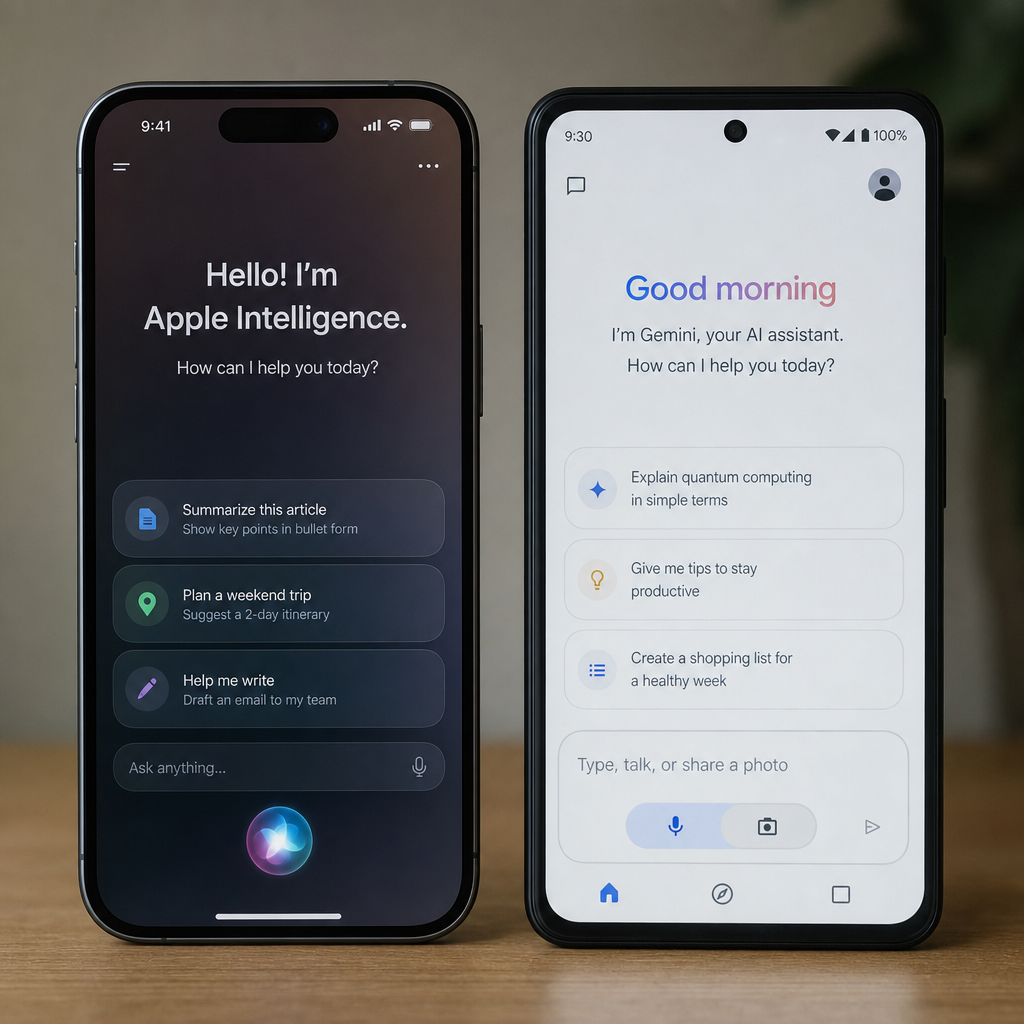
Those tasks still matter. But they are no longer the whole story. The modern siri ai vs google assistant comparison is about whether the assistant can handle messy human requests and act across your digital life. A useful assistant should be able to read context, ask follow-up questions, summarize information, draft messages, search what is on screen, and help finish a task without sending you through five apps.
Apple’s iOS 27 approach focuses on making Siri AI feel like part of the operating system. Apple says Siri AI can support richer answers, natural conversation, personal context, app actions, and a dedicated Siri app. It also says Siri AI features are rolling out in English and that usage limits may apply. (apple.com)
Google’s approach is broader and more cloud-connected. Gemini can work as the built-in AI assistant on Android, respond to text, voice, images, and camera input, connect with Google apps, and support Gemini Live for real-time spoken chats. (support.google.com)
This makes the comparison more practical than philosophical. You are not just choosing a voice. You are choosing which assistant sits closest to your messages, photos, calendar, docs, browser, smart home, and search history.
Siri AI on iOS 27 is strongest inside the Apple ecosystem
Siri AI's biggest advantage is not just that it exists on the iPhone. It is that it can be woven through Apple’s systems in a way that feels steady, private, and close to the apps people already use every day.
Apple describes Siri AI as powered by Apple Intelligence, with natural conversation, personal context, broader world knowledge, and the ability to take actions in apps such as Messages, Music, and Reminders. Apple also points to features like finding relevant photos or emails, editing a message, adding a song to a playlist, and using online information for fresh insights. (apple.com)
For an iPhone user, that matters because the assistant does not need to feel like a separate chatbot pasted on top of the phone. It can work more like a system layer. If you are writing, searching, calling, organizing reminders, or moving between Apple devices, Siri AI can be most useful when it knows what you are doing right now.
Where Siri AI has a natural edge
Siri AI on iOS 27 makes the most sense for people who want help that is tightly linked to Apple hardware and default apps. Its strengths are less about flashy demos and more about everyday flow.
Key advantages include:
- Native iPhone integration: Siri AI is built for iOS rather than added as a third-party layer.
- Personal context: Apple says Siri AI can help find information from photos, email, notes, and other personal content when relevant. (apple.com)
- Cross-device continuity: Apple’s iOS 27 Siri AI announcement describes support across iPhone, iPad, Mac, Apple Watch, Apple Vision Pro, and other supported Apple devices. (apple.com)
- Privacy-focused architecture: Apple emphasizes on-device processing and Private Cloud Compute for requests that need larger server-based models. (apple.com)
- System actions: Siri AI is meant to take actions in Apple apps and supported experiences, not just answer questions.
The practical benefit is simple. If you already use Apple apps as your default workspace, Siri AI can cut friction. You can ask for help in the same place where your calendar, messages, notes, photos, and reminders already live.
Where Siri AI may feel limited
Siri AI’s biggest limit is also tied to its biggest strength: Apple’s controlled ecosystem. If your work and personal life are spread across Google Workspace, Android devices, Windows laptops, Chrome, and non-Apple smart home products, Siri AI may not be the most flexible assistant everywhere you need help.
Availability also matters. Apple lists specific supported devices for Siri AI and Apple Intelligence in iOS 27, including iPhone 16 models or later, iPhone 15 Pro models, and supported iPad, Mac, Apple Watch, and Apple Vision Pro devices. Apple also notes regional limits, including that Siri AI is not initially available for iOS, iPadOS, and watchOS users in the EU and is not available in China while Apple works through regulatory requirements. (apple.com)
That does not make Siri AI weak. It means the best experience depends on the right Apple device, language, region, and app habits.
Google Assistant has become a Gemini-centered experience
Any fair Siri AI on iOS 27 vs Google Assistant comparison needs one key point: on mobile, Google has been moving the Assistant experience toward Gemini. Google announced in 2025 that it was upgrading more mobile users from Google Assistant to Gemini and that classic Google Assistant would no longer be available on most mobile devices later that year. Google also said tablets, cars, headphones, watches, and home devices would move toward Gemini-powered experiences over time. (blog.google)
So when people say Google Assistant today, they may mean several related things. They may mean the classic Assistant, Gemini on mobile, Gemini Live, Google app extensions, or the assistant behavior built into Android and smart home devices. That can be confusing, but it also shows Google’s strategic edge. Google is not just improving a voice assistant. It is bringing Gemini into Search, Android, Chrome, Gmail, Maps, YouTube, and connected services.
On Android, Google says Gemini can act as the built-in AI assistant that opens over the current screen, responds through voice or touch, connects with apps such as Gmail, Maps, Tasks, and YouTube Music, and helps with lists, reminders, phone settings, and playlists. (support.google.com)
That gives Google a strong base for users who want an assistant that can move between search, productivity, navigation, media, and web content.
Where Google has a natural edge
Google’s advantage is breadth. If Siri AI feels native inside Apple’s world, Gemini feels powerful wherever Google services are central.
Google Assistant and Gemini are especially compelling for:
- Search-heavy questions: Google’s assistant experience benefits from Google’s long-standing strength in web info and search intent.
- Google app users: Gmail, Maps, YouTube, Tasks, and YouTube Music links can make Gemini useful for planning, navigation, summaries, and media.
- Android users: Gemini can be set as the mobile assistant on Android and activated by voice or touch when available. (support.google.com)
- Multimodal use: Gemini supports text, voice, images, and camera-based help in the mobile app. (support.google.com)
- Chat depth: Gemini Live is made for more natural back-and-forth chats. (support.google.com)
This makes Google’s assistant feel especially strong for people who ask broad questions, compare options, plan trips, sum up content, or work across several Google services during the day.
Where Google can feel less seamless
Google’s assistant story can feel less simple because the product names and experiences have changed. Some users still think in terms of Google Assistant, while newer Android phones may guide them toward Gemini. Some familiar Assistant features may still be handled by Google Assistant behind the scenes while Gemini keeps learning quick voice actions, depending on device, settings, language, and country. (support.google.com)
Privacy expectations are also different. Google gives Gemini privacy controls and says users can manage how activity is saved and used, with Gemini Apps Activity set by default to auto-delete after 18 months and adjustable by the user. (safety.google)
For users who prefer Apple’s on-device-first message, Google’s cloud-connected model may take more active comfort with account-based personalization.
Which assistant is better for everyday tasks?
For everyday phone tasks, Siri AI is better if your day happens mostly on Apple devices. Google Assistant or Gemini is better if your day depends on Google services, Android, and web search. Siri AI should feel smoother for iPhone-native actions like finding personal content, working with Apple apps, and moving across Apple devices. Google’s assistant experience should feel stronger for open-ended information, Gmail and Maps workflows, Android screen context, and broader web-connected help.
That difference shows up in normal moments. If you are driving and want directions to a saved place, Google Maps users may prefer Gemini or Google Assistant. If you are on an iPhone and want to find a specific photo, pull context from a message, or work across Apple apps, Siri AI may be the more natural choice.
For many people, the real answer is not either-or. iPhone users can still use the Gemini app for research, writing, brainstorming, and Google-connected tasks. Android users can still live partly in Apple services, but they will get the deepest assistant integration from Gemini on Android. The default assistant matters most when you want hands-free speed, lock-screen actions, app control, and system-level awareness.
Privacy and personalization are the core tradeoff
The most important siri vs google difference may be how each company balances privacy and personalization. AI assistants become more useful when they understand your context, but that context often includes sensitive information: messages, appointments, locations, photos, contacts, searches, documents, and voice requests.
Apple’s pitch is that Siri AI can be personal without broadly exposing personal data. Apple says Apple Intelligence uses on-device processing when possible and Private Cloud Compute for larger server-based models, without making user data available to Apple or anyone else. (apple.com)
That framing is likely attractive to users who want AI help but are cautious about how much personal data is handled in the cloud.
Google’s pitch is that useful help comes from linking Gemini to the services people already rely on. Gemini can work with Google apps through extensions, and Google gives users controls that let them manage Gemini activity and auto-delete settings. (support.google.com)
That framing is likely attractive to users who value strong personalization across search, email, maps, media, and productivity tools.
Neither approach is automatically right for everyone. The better question is what kind of trust model you prefer.
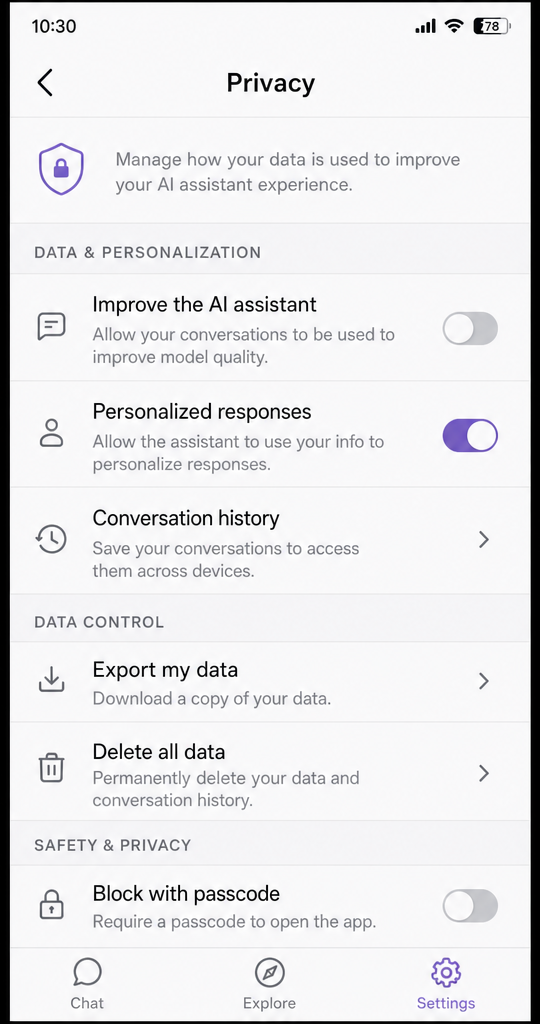
Use this privacy checklist before making either assistant your daily default:
- Review connected apps: Know which mail, calendar, photo, notes, smart home, and music services your assistant can access.
- Check activity settings: Look at whether your assistant history is saved, how long it stays, and how to delete it.
- Test lock-screen behavior: Decide what the assistant can do before the phone is unlocked.
- Limit sensitive requests: Avoid asking any assistant to process information you would not want stored, sent, or reviewed under its rules.
- Revisit settings after updates: AI assistant features change fast, so privacy controls should not be a one-time setup.
The best ai voice assistants will feel more proactive over time. That makes privacy settings more important, not less.
App control is where the battle gets practical
An assistant becomes truly useful when it can do things, not just talk about them. This is where Siri AI and Google’s Gemini-powered Assistant experience are both moving fast.
Apple says Siri AI can take actions in apps such as Messages, Music, Reminders, and more based on what the user is doing. It also highlights Apple Intelligence features like suggestions in Messages and Mail, proofreading, call context, and Live Translation across supported apps and devices. (apple.com)
These features matter because they turn Siri from a command receiver into a helper that understands the current task.
Google is pushing hard into multi-step actions. Google’s 2026 Gemini Intelligence announcement says Android features are designed to automate complex tasks, summarize web content, simplify form filling, polish spoken messages, and create widgets using natural language. Google also says Gemini Intelligence is rolling out in waves to the latest Samsung Galaxy and Google Pixel phones, with broader support across Android devices including watches, cars, glasses, and laptops later in 2026. (blog.google)
The difference is style. Apple looks strongest when the task lives inside Apple’s own space. Google looks strongest when the task uses web info, Google services, Android, Chrome, or multi-app automation.
For example:
- Writing a message: Siri AI may be ideal inside Messages or Mail on iPhone, especially when tone and context matter.
- Planning a route: Gemini or Google Assistant may be better if Google Maps is your daily navigation app.
- Finding a personal file: Siri AI may shine with Apple Photos, Mail, Notes, and device search.
- Researching a purchase: Gemini may feel stronger when comparing web pages, YouTube videos, reviews, and Google Search results.
- Controlling smart devices: The better assistant depends on whether your home is built around Apple Home, Google Home, or mixed devices.
Multimodal help is becoming the new standard
The next phase of assistant competition is not just voice. It is voice plus screen, camera, image, text, and context.
Apple says Siri AI brings visual intelligence and multimodal features, including ways to ask about visual content and take action based on what is on screen or in front of the user. The iOS 27 Siri AI announcement also describes Visual Intelligence expansion across iPad, Mac, and Apple Vision Pro, as well as image understanding in the Camera app on iPhone. (apple.com)
Google has also made multimodal help central to Gemini. The Gemini mobile app can use text, voice, images, and the camera, while Android support pages describe Gemini as available over the current screen and able to help with context in some apps. (support.google.com)
In daily life, multimodal help is what makes an assistant feel less like a search box. You can point your camera at something, ask what it is, sum up a visible document, get help with a screen, or turn a spoken thought into a cleaner message. The assistant that wins will not simply be the one with the best answer. It will be the one that understands the situation with the least setup.
Device and language availability can decide the winner
A feature only matters if it works on your device, in your language, and in your region. That is especially true with AI assistant comparisons because headline features often roll out in stages.
Apple's iOS and iPadOS 27 feature availability page lists Siri AI and Apple Intelligence features such as Product Knowledge, Richer Language Understanding, Type to Siri, and More Advanced Dictation across supported languages, with some features having narrower language support. (apple.com)
Apple also lists supported hardware for Siri AI and Apple Intelligence, so users with older iPhones may not get the full experience. (apple.com)
Google's Gemini mobile app is available across many countries and territories, but Google notes that availability can vary by language, device, account, and location. Google also says some Gemini mobile app features, including certain Google Assistant-powered quick voice actions, may not be available for work or school accounts. (support.google.com)
Before choosing based on a feature list, check these practical details:
- Is your phone model supported?
- Is the assistant available in your country?
- Does it support your preferred language for voice?
- Does your work or school account limit features?
- Do your most-used apps connect to the assistant?
- Are smart home controls supported for your devices?
- Are the newest AI features fully released, or still rolling out?
This is one reason Siri AI on iOS 27 vs Google Assistant has different answers for different people. A Pixel owner in one region and an iPhone owner in another may be comparing very different real-world feature sets.
Choosing the right assistant for your daily workflow
The best way to choose is not to ask which assistant is smarter in the abstract. Ask which one removes more friction from your real day.
Choose Siri AI on iOS 27 if you:
- Use iPhone as your main device.
- Rely on Apple Photos, Messages, Mail, Notes, Reminders, Calendar, Music, and Shortcuts.
- Own multiple Apple devices and care about continuity.
- Prefer Apple’s privacy message and on-device processing model.
- Want your assistant to feel built into iOS rather than layered on top.
Choose Google Assistant or Gemini if you:
- Use Android as your main phone platform.
- Depend on Gmail, Google Maps, Chrome, YouTube, Google Drive, Tasks, or YouTube Music.
- Ask a lot of open-ended research and planning questions.
- Want strong web-connected answers and Google app extensions.
- Use Google Home or Android-compatible smart devices.
Use both if you:
- Have an iPhone but prefer Google for research, maps, or email.
- Have an Android phone but use Apple services in parts of your life.
- Want Siri AI for device tasks and Gemini for brainstorming, comparing, and searching.
- Care more about task quality than brand loyalty.
This hybrid approach is underrated. Your default assistant should be the one that handles hands-free, system-level tasks best. Your secondary AI app can be the one that handles deeper writing, research, or planning.
Should iPhone users switch apps or stay with Siri AI?
Most iPhone users should treat Siri AI as the default assistant for system tasks and use Gemini as a support app when Google-style research or cross-service planning is useful. Siri AI has the edge in iOS integration, Apple device context, and privacy-focused design. Gemini can still be valuable on iPhone for brainstorming, web-connected questions, Google app workflows, planning, and multimodal help through the Gemini mobile app.
In other words, iPhone users do not need to switch in a dramatic way. They can let Siri AI handle the phone and let Gemini handle web-heavy thinking. That setup may be more practical than forcing one assistant to do everything.
Android users face a different choice because Gemini can become the built-in assistant experience. If your phone already routes assistant behavior through Gemini, the question is less Should I use Google Assistant? and more Have I set up Gemini well? That means reviewing extensions, voice activation, lock-screen access, privacy settings, and connected apps.
The bottom line on Siri AI vs Google Assistant
The Siri AI on iOS 27 vs Google Assistant debate comes down to where you live digitally. Siri AI is built for people who want a personal, private, system-level assistant inside Apple’s ecosystem. Google Assistant, now increasingly represented by Gemini on mobile, is built for people who want a web-connected, Google-services-driven assistant across Android, Search, Chrome, Maps, Gmail, and more.
If your daily life is Apple-first, Siri AI is likely the smoother and more trusted default. If your daily life is Google-first, Gemini is likely the more capable everyday assistant. If your life is mixed, the smartest move is to use each assistant where it is strongest: Siri AI for Apple-native actions and Gemini for search, research, planning, and Google-connected workflows.
The future of ai voice assistants will not be won by the loudest wake word. It will be won by the assistant that understands your context, respects your limits, and helps you finish real tasks with the fewest taps.
FAQs
1. Is Siri AI on iOS 27 clearly better than Google Assistant or Gemini?
Not for everyone. Siri AI is usually better for people who live mainly in Apple’s ecosystem and want deep iPhone, iPad, Mac, Apple Watch, and Apple Vision Pro integration. Google Assistant, now mostly Gemini on mobile, is usually better for people who rely on Android, Google Search, Gmail, Maps, YouTube, Chrome, and Google smart home products.
2. Why does the article say the comparison is no longer just about voice commands?
Modern AI assistants are expected to do more than set alarms, answer trivia, or turn on lights. The comparison now focuses on whether an assistant can read context, summarize information, work across apps, handle images or screen content, draft messages, ask follow-up questions, and help finish real tasks with fewer steps.
3. What is the biggest privacy difference between Siri AI and Google’s assistant experience?
Apple emphasizes on-device processing and Private Cloud Compute, so Siri AI is framed as a privacy-first assistant that can use personal context without broadly exposing user data. Google emphasizes connected, account-based help across Search, Gmail, Maps, and YouTube, while giving users controls for Gemini activity, storage, and auto-delete settings.
4. Should iPhone users use Gemini at all if Siri AI is built into iOS 27?
Yes. Many iPhone users may benefit from both. Siri AI can be the default assistant for Apple-native and system-level tasks, while Gemini can be useful for web-heavy research, brainstorming, Google app workflows, planning, and multimodal help through the Gemini mobile app.
5. What should someone check before choosing an AI assistant based on features?
They should confirm that their phone model, region, language, account type, apps, and smart home devices are supported. Both Siri AI and Gemini can vary by device, country, language, rollout timing, and whether the user is on a personal, work, or school account.