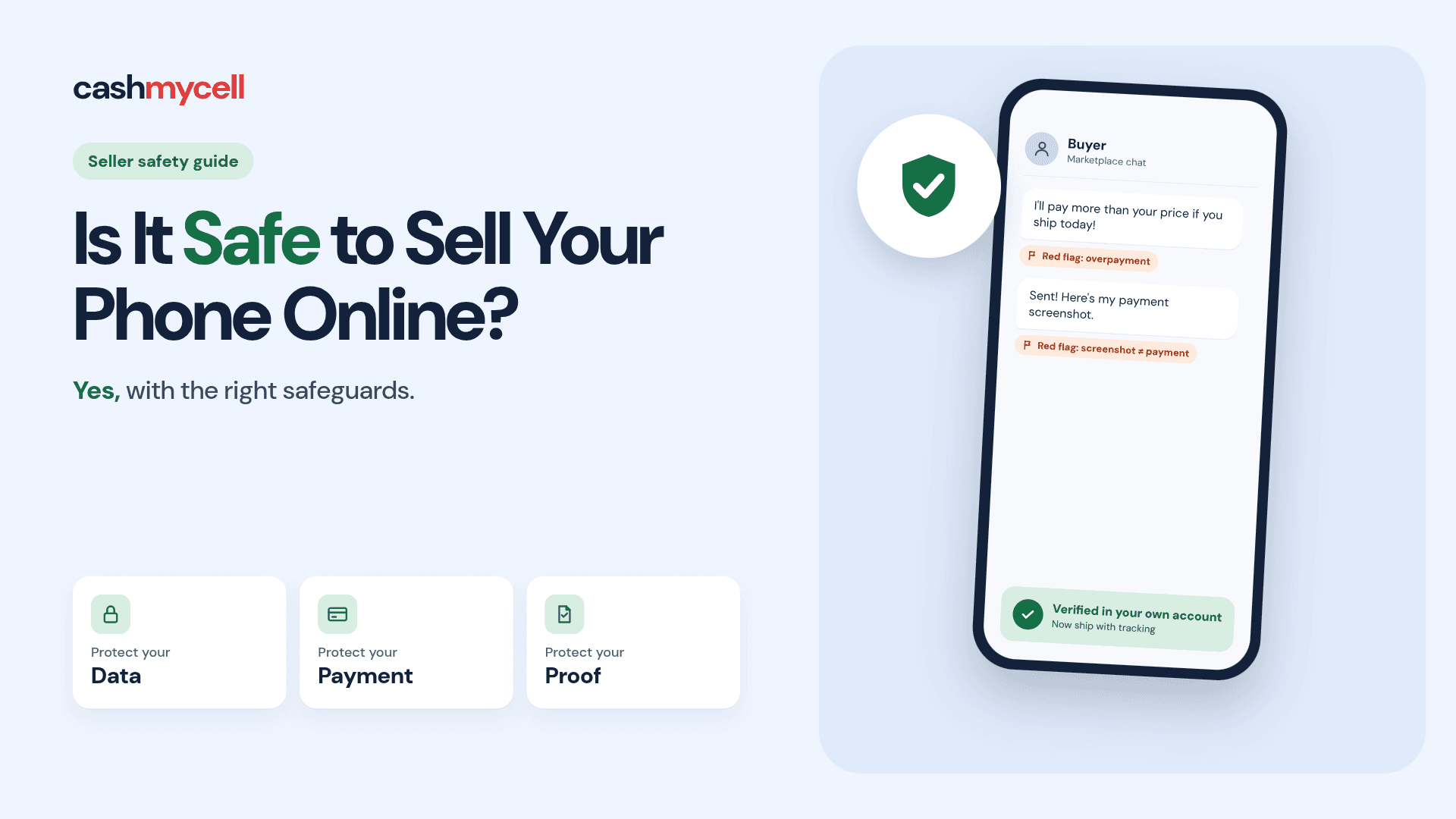
Selling a used phone online can be safe, convenient, and worthwhile when you handle the process carefully. The key is to protect your personal data, choose a trustworthy selling method, document the transaction, and avoid payment or shipping situations that put you at risk. This guide walks through practical phone selling tips so you can approach online phone selling with more confidence and fewer surprises.
Is it safe to sell your phone online?
Yes, it is generally safe to sell your phone online if you prepare the device properly and use sensible safeguards throughout the sale. The biggest risks are not usually the sale itself, but the small details people rush through: leaving personal data on the device, accepting suspicious payments, shipping without proof, or communicating outside a platform that offers some level of protection.
Safe phone selling online starts before you create a listing. Your phone may contain photos, passwords, saved payment cards, health data, location history, messages, app sessions, and account connections. Even if the buyer seems honest, you should treat the device as something that once held private information and needs to be fully disconnected from your digital life.
There is also a financial safety side. A buyer may try to overpay and ask for a refund, claim a package never arrived, send a fake payment confirmation, or pressure you into moving fast. None of these risks mean you should avoid selling your phone online altogether. They simply mean you should use a process that makes the transaction clear, traceable, and hard to manipulate.
One way to avoid many of these risks is to sell your phone through Cashmycell, which compares cash offers from verified buyback stores no stranger meetups, no payment disputes, and no shipping guesswork.
The main risks are manageable
Online phone selling feels risky because phones are valuable, portable, and packed with personal information. But most risks fall into a few predictable categories, and each one has a practical fix. When you know what can go wrong, you can avoid the common mistakes that make a sale stressful.
The first risk is data exposure. A normal deletion of photos, apps, or messages is not the same as preparing the phone for a new owner. You need to sign out of accounts, remove device tracking connections, erase the phone, and confirm it starts like a fresh device.
The second risk is payment trouble. Some payment methods can be reversed, faked, delayed, or disputed. This is why it is wise to use established platforms or payment systems with clear records instead of relying on screenshots, promises, or unusual instructions from a buyer.
The third risk is delivery disputes. If you ship a device without tracking, insurance, photos, or proof of condition, you may have a harder time responding if a buyer claims the phone was damaged, missing, or different from the listing. Careful packaging and documentation are simple habits that protect both sides.
Common risks to plan for include:
- Personal data left behind: Contacts, photos, accounts, and app sessions may remain if the phone is not erased correctly.
- Account locks: If activation locks or device tracking features stay enabled, the buyer may not be able to use the phone.
- Fake payment notices: Scammers may send emails or screenshots that look like payment confirmations.
- Refund tricks: A buyer may claim an issue after receiving the phone, especially if the listing was vague.
- Shipping claims: Damage, loss, or delivery disputes are harder to handle without tracking and documentation.
- Unsafe meetups: Local sales can be fine, but private or rushed meeting locations create unnecessary risk.
Prepare your phone before listing it
A safe sale begins with preparation. Before you think about price or photos, make sure you know the phone’s exact model, storage size, carrier status, condition, and whether it is unlocked. Buyers will ask these questions, and clear answers reduce confusion later.
Back up anything you want to keep. Use your preferred cloud backup, computer backup, or file transfer method, and check that important photos, notes, contacts, and documents are actually saved somewhere else. Do not erase the phone until you are comfortable that you can recover what matters.
Next, remove your personal connections. Sign out of major accounts, turn off device tracking features, unpair watches or accessories, remove payment cards, and disconnect the phone from services that might still recognize it as yours. If the phone uses a SIM card or removable storage card, take them out before handing it over or shipping it.
Then perform a full factory reset through the phone’s settings. After the reset, the device should restart at the initial setup screen. If it asks for your old account password during setup, an activation lock may still be active, and you should resolve that before selling.
A practical pre-listing checklist:
- Back up your data and verify the backup worked.
- Transfer authentication apps or passkeys so you do not lose access to important accounts.
- Sign out of cloud and device accounts connected to the phone.
- Turn off tracking and activation-lock features where applicable.
- Remove SIM cards and memory cards before sale or shipment.
- Unpair connected accessories such as watches, earbuds, or car systems.
- Factory reset the phone using the device’s official settings menu.
- Check the setup screen to confirm it is ready for a new user.
- Clean the phone gently and remove dust from the case or edges. Before you list anywhere, check what your phone is worth on Cashmycell to set a realistic price baseline knowing the market value helps you spot lowball offers and overpriced scam bids.
- Gather accessories you plan to include, such as a box, cable, or case.
These steps may take a little time, but they are the foundation of safe phone selling online. They protect you, help the buyer, and make your listing more credible.
What should you include in your listing?
Your listing should clearly describe what the phone is, what condition it is in, what is included, and how the sale will be handled. A good listing does not need to sound like a sales pitch. It needs to be accurate enough that the buyer knows what they are getting and you have a written record of what you promised.
Start with the basics: brand, model, storage size, color, carrier compatibility if you know it, and whether the device is locked or unlocked. Mention the battery condition if your phone provides that information, but avoid guessing if you are not sure. If the phone has scratches, dents, screen marks, camera issues, speaker problems, charging problems, or replacement parts, state that plainly.
Photos matter because they set expectations. Take clear pictures in good lighting from multiple angles: front, back, sides, corners, camera area, charging port, and screen on if possible. If there is damage, photograph it directly instead of trying to hide it. Honest photos may not attract every buyer, but they reduce disputes and wasted messages.
A strong listing usually includes:
- Exact device details: Model, storage, color, and network status.
- Condition notes: Scratches, dents, repairs, battery information, and any known issues.
- Included items: Original box, charging cable, case, screen protector, or no accessories.
- Clear photos: Multiple angles, close-ups of damage, and the screen powered on.
- Sale terms: Shipping method, local pickup option, accepted payment method, and return expectations.
- Reset status: A note that the phone will be factory reset and removed from your accounts.
This is one of the most underrated phone selling tips: write the listing as if it may need to settle a misunderstanding later. If the description is honest and specific, you have a better record of the deal.
Choosing where to sell affects your safety
Where you sell your phone can matter as much as how you sell it. Different selling options offer different balances of convenience, price, speed, and protection. The safest choice depends on whether you care more about getting the highest possible offer, finishing quickly, or minimizing direct interaction with buyers.
Marketplace-style platforms may help you reach more buyers and compare offers, but you still need to manage messages, payments, shipping, and possible disputes. Trade-in programs or buyback services may offer a simpler process, though the offer may be lower than what an individual buyer would pay. Local sales can be fast and avoid shipping, but they require smart meetup habits.
Think about your comfort level before choosing. If you do not want to negotiate, answer many questions, or handle shipping, a more structured service may be worth considering. If you are comfortable with listings and buyer communication, a marketplace can work well as long as you follow platform rules and keep everything documented.
A simple way to compare your options:
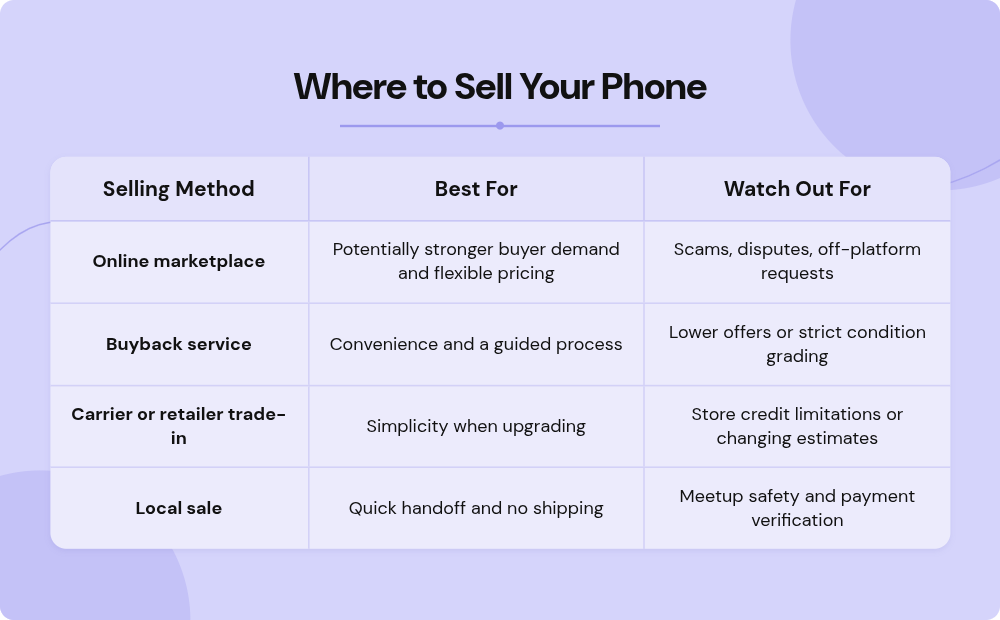
No method is perfect. The goal is to choose the route that matches your risk tolerance and then follow the safety habits that fit that route. If safety and simplicity are your top priorities, compare offers on Cashmycell every buyer is verified, shipping is covered, and payment typically arrives within 24–48 hours with no back-and-forth negotiation.
Payment and shipping deserve extra care
Payment is where many online selling problems begin. Be cautious with buyers who rush you, offer more than your asking price, ask you to refund a third party, or send links that require you to log in. A real buyer should be willing to use a normal, agreed-upon payment process.
Do not treat an email, text, or screenshot as proof of payment by itself. Check your actual account or the platform’s transaction page before shipping. If payment is pending, unclear, or connected to unusual instructions, wait. A serious buyer may be impatient, but a safe transaction should not require you to ignore common sense.
Shipping also needs a paper trail. Use a trackable shipping method, package the phone securely, and consider insurance or signature confirmation when appropriate. Before sealing the box, take photos or a short video showing the phone’s condition, serial or device details if you are comfortable documenting them, and the accessories included. Keep the receipt and tracking number.
For local sales, meet in a public, well-lit place. Some communities have designated safe exchange areas near public buildings or police stations. Avoid inviting strangers to your home, and do not hand over the phone until payment is verified in a way you trust.
Good payment and shipping habits include:
- Keep communication on the selling platform when possible.
- Refuse overpayment arrangements or requests to send money back.
- Verify payment in your own account, not through a buyer’s screenshot.
- Ship only to the address connected with the transaction when platform rules require it.
- Use tracking and keep your shipping receipt.
- Photograph the phone and package before shipment.
- Save the listing, messages, payment record, and tracking details.
With verified buyback stores on Cashmycell, payment and shipping are handled through the buyer's established process — prepaid labels, tracked shipping, and direct payment removing most of the risk you'd face selling to an individual.
Red flags that a buyer may not be legitimate
Most buyers simply want a working phone at a fair price, but a few warning signs should make you slow down. A scammer often creates urgency because they do not want you to think through the details. If a buyer’s request feels complicated, emotional, or oddly specific, pause before moving forward.
Be cautious if someone wants to move the conversation to a different app immediately, especially before asking normal questions about the device. Be equally cautious if they claim they cannot use the platform’s payment system, want to send a courier, or ask you to include gift cards, extra items, or personal notes in the package.
You should also be wary of buyers who avoid specifics. A legitimate buyer may negotiate, but they usually care about model, condition, compatibility, and shipping. A suspicious buyer may be strangely eager, barely discuss the phone, and focus instead on payment instructions.
Watch for these red flags:
- The buyer offers more than your asking price without a clear reason.
- They send a payment screenshot but no confirmed payment appears in your account.
- They ask you to ship before payment clears.
- They pressure you with an emergency story.
- They want to use a payment method you do not understand.
- They ask for codes sent to your phone or email.
- They request personal information unrelated to the sale.
- They refuse to follow the platform’s normal process.
Trusting your instincts is useful, but process matters more. If you always verify payment, document the phone, and avoid strange instructions, you make yourself a harder target.
Protect your privacy after the sale
Once the phone is sold, do a final cleanup on your side. Remove the old device from your account dashboards if you have not already. Check your cloud account, app store account, messaging services, and any device management pages to make sure the phone no longer appears as an active device.
If you used the phone for two-factor authentication, confirm that your new device receives codes and that backup options are current. This is especially important before you permanently part with the old phone, because losing access to an authenticator app can create headaches later.
Keep your transaction records for a while. Save the listing, buyer messages, payment confirmation, shipping receipt, tracking number, and photos of the package. You may never need them, but they are helpful if a dispute or question comes up after delivery.
Smart habits make online phone selling easier
The safest sellers are not necessarily experts. They are simply consistent. They prepare the phone, describe it honestly, choose a reasonable selling method, verify payment, and keep records. Those habits remove much of the uncertainty from online phone selling.
If you are nervous, start with the method that gives you the most structure, even if it may not produce the highest price. Cashmycell is built for exactly that compare cash offers from multiple verified buyers for your iPhone, Samsung, or Google Pixel in seconds, with no account required and no listing to manage. If you are experienced, you may be comfortable managing your own listing and negotiating with buyers. Either way, the basics remain the same: protect your data, protect your payment, and protect your proof.
Here is the simple takeaway: yes, selling your phone online can be safe, but it should not be casual. Treat the device like a personal-data container first and a product second. With careful preparation and a clear process, you can turn an old phone into value without taking unnecessary risks.